




Laptop Spreadsheets in a Café: A Second Screen Without a Monitor Stand
For a 13-inch laptop at a crowded café table, a compatible XREAL display can serve as an extended second screen while the laptop keeps the main workbook. That saves the extra panel's table footprint. Several independently positioned virtual screens require a specific host/software setup; they do not appear automatically from screen mirroring. Decide by readable spreadsheet space at your normal zoom.
A first-hand Notebookcheck One Pro review reported text-focusing difficulty for its reviewer with an IPD below the supported range. That individual result supports testing your own fitted text task; it is not a prediction for every wearer.
Model-specific images and specifications
Manufacturer specifications checked on 6 November 2026. Images identify the named models; they are not to scale. Maximum specifications do not establish the result of every source, mode or fitted setup. Foreign-store links below are technical references, not local availability or price offers.
XREAL One Pro
Source: XREAL · XREAL One Pro
| Parameter | Manufacturer specification |
|---|---|
| Field of view | 57° |
| Per-eye resolution | 1920 × 1080 |
| Maximum refresh rate | 120 Hz |
| Spatial positioning | Native 3DoF; X1 chip |
| Weight | 87 g |
| IPD sizes | M 57–66 mm; L 66–75 mm |
XREAL Air 2
Source: XREAL · XREAL Air 2
| Parameter | Manufacturer specification |
|---|---|
| Field of view | 46° |
| Display | 1920 × 1080 per eye |
| Maximum 2D refresh | 120 Hz |
| Weight | 72 g |
What the hardware actually supplies
The One Pro specification lists 87 g, 57° field of view, 1080p and up to 120 Hz, with native 3 DoF from the X1 chip. The Air 2 family is different: Air 2 is specified at 72 g, 46° and 1920 × 1080 per eye. A 1080p image sent to each eye is not a 3840 × 2160 desktop. A larger apparent screen does not create more source pixels.
Three display layouts that should not be conflated
| Layout | What it gives you | When it helps |
|---|---|---|
| Mirrored laptop screen | Same desktop in glasses | Private viewing or looking up from the laptop |
| Extended desktop in OS settings | A second display with its own windows | Spreadsheet on one screen, reference material on the other |
| Software-managed spatial windows | Depends on the exact software, host and model | Multiple positioned work areas only after that configuration is demonstrated |
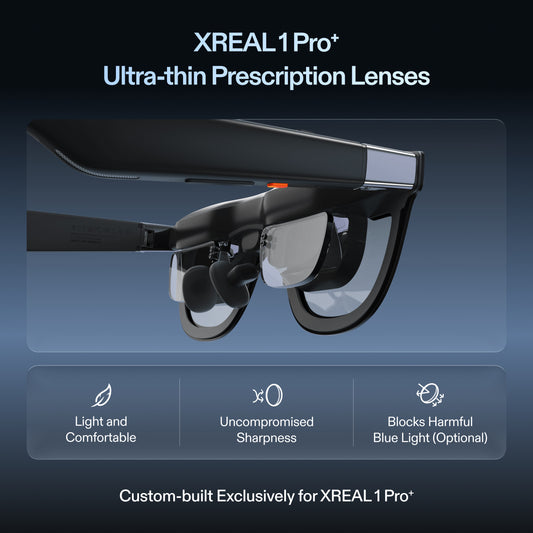
One Pro's native 3 DoF positions its display; it does not by itself promise three independent macOS or Windows monitors. The Air 2 page names Nebula for Mac as beta. For that route, check the current supported Mac/OS build and demonstrate your required window layout before paying for it. Do not assume a Mac beta is a universal Windows or Linux solution.
A repeatable reading test
Use a real code file, terminal and spreadsheet. Keep OS scaling and application zoom recorded, then compare centre text, the last column at the edge, punctuation and the longest line you use. Try one normal work block with the fitted prescription insert if required. Count whether you can comfortably read the content you need, rather than enlarging text until an impressive-looking screen contains less work than the laptop.
For power, compare the laptop's battery drop over the same task and duration at matched conditions, once with the external display and once without. The glasses take power from the source; no measured percentage penalty is established here. A quoted frame rate or glasses weight cannot predict your laptop's battery life.
Work through the actual café task
Keep your working sheet on the laptop and move a reference workbook or browser to the external display. Compare a row of identifiers, a totals column at the edge and small formula punctuation. Record the visible columns at a comfortable zoom. If the worn display requires so much enlargement that less information fits, a portable monitor or the laptop alone may be more productive for that task.
A hotel desk may permit a physical panel that a train tray cannot. For travel, pack the cable, prescription insert, source charger and any required converter before comparing bulk. USB-C needs actual DisplayPort output, not just charging capability. If a multi-window Mac workflow is the reason for buying, request the current supported beta and a live demonstration with your OS build.
Use the UK seller's complete delivered quotation and the applicable return/custom-lens conditions. No shared independent text-clarity or battery benchmark is established here; the proposed comparison provides a practical decision for your own work rather than a universal readability claim.
Continue planning the setup
Related guide: Packing a useful display for one bag travel
Verified product facts
| Parameter | Documented value / condition |
|---|---|
| XREAL One Pro | 57° field of view; X1 native 3DoF; up to 120 Hz |
| IPD sizing | M: 57–66 mm; L: 66–75 mm. Verify fit before ordering |
Product details are taken from the cited manufacturer documentation. Confirm the selected regional product and its current instructions.


XREAL Air 2 · manufacturer source
Frequently asked questions
Can plugging in display glasses create three independent monitors?
A video connection first supplies a display. Mirroring, an extended desktop and software-managed spatial monitors are different configurations. Demonstrate the exact host, operating system, software and glasses before buying for a three-monitor requirement.
What advantage does One Pro offer over Air 2 for a small workspace?
One Pro has native X1-powered 3DoF positioning and a wider stated field of view. Air 2 is lighter. Neither specification proves that your smallest code or spreadsheet text will be readable; compare the same file and scaling.
Can a portable monitor still be the better choice?
Yes. Prefer it when you need a directly visible panel for sharing, dislike a fitted wearable display or cannot verify the required software. Glasses are attractive when table space and a personal image matter more.
Does any USB-C laptop port work?
No. The source must supply compatible DisplayPort video over USB-C and power. Confirm the exact port and cable; a USB-C connector alone is insufficient.
What should I check before replacing my monitor?
Test your actual code, terminal and last spreadsheet column with the finished fit and any prescription insert. Record OS scaling, window layout and battery drop during the same work task, then compare the complete kit and return conditions.
Sources and scope
- uk.shop.xreal.com/products/xreal-one-pro
- uk.shop.xreal.com/products/xreal-air-2
- uk.shop.xreal.com/blogs/guides/one-bag-travel-glasses-or-portable-monitor
- www.notebookcheck.net/Xreal-One-Pro-AR-glasses-review-A-giant-external-display-wherever-you-go.1194048.0.html
- us.shop.xreal.com/products/xreal-air-2